This report is intended to provide you an individual balance for each and every matter that has Trust that is considered dormant and will provide you with a grand total figure of the dormant balances at the end of the report.
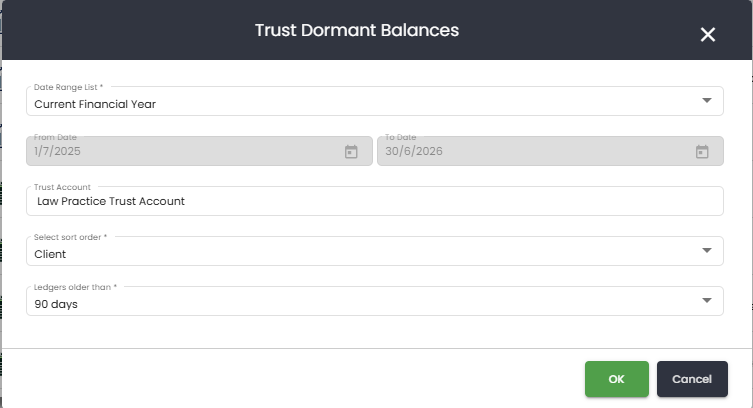
SILQ allows you to specify how long ago the last transaction needs to be in order for it to be considered dormant. The options are 90 days, 6 months, 1 year and 2 years.
From the reports window, when you click on this report, you are able to choose the date range as well as the way the report is sorted - either by client name or matter number.
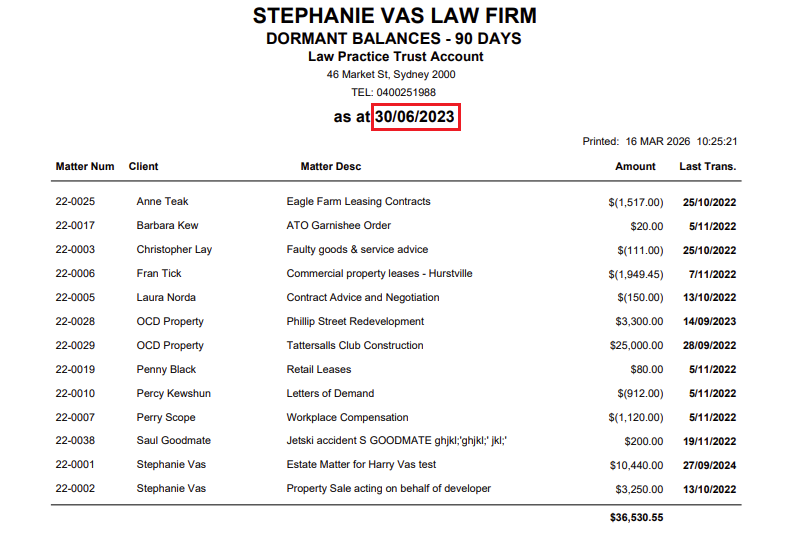
The report will then come up as below. An explanation of each section is:
1. As at (red box) - This date will be based on the date range you chose. For example, this report was printed on the 20th of March 2023 for the current financial year, therefore the as at date is the 30th of June 2023 and it will show balances up until that date. If however, the previous quarter was chosen, it would show the balances as they were on the 31st of December 2022. That report would not include any entries after that date even though it was printed almost 3 month later.
2. Matter Number - The matter number linked to that trust leger
3. Client - The name of the client linked to the trust ledger
4. Matter Desc - The description of that matter
5. Amount - This is the total amount of trust transactions for that trust ledger
6. Last Trans - the last time an entry was made for that trust ledger.