
To set up SILQ to start using AML you need to:
1. Login, navigate to System settings > Integrations and then expand the AML field using the down arrow on the right-hand side.
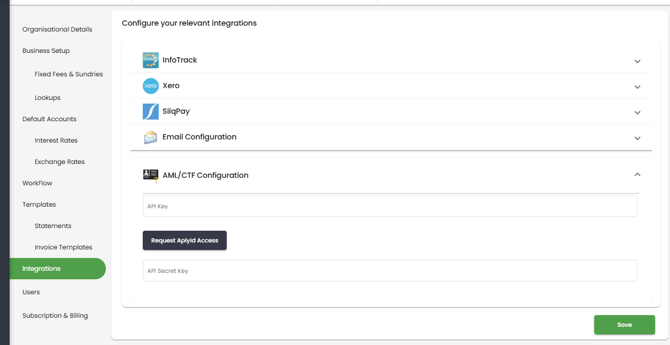
2. Click the 'Request AplyID Access' button. AplyID are SILQ's integration partner for AML. AplyID are certified by AUSTRAC to provide AML and KYC services.
This step is mandatory.
If this is not done then AplyId will not be able to link your application back to your SILQ database and so it will not be processed.
3. Once you have clicked this button, you will be requested to fill out this form via AplyID. https://registration.aplyid.com/forms/DVS-AUEntity
The purpose of this form is to certify your practice to access the Document Verification System so you can complete your KYC checks.
- Registered Company Name : If you are not registering a company enter the name of your partnership/trading name
- Registered Company Number: If you are not registering a company enter your ABN if you are registered for GST otherwise leave this blank
4. Once filled out, AplyID may take up to 48 business hours to review and approve your form. Once approved, the API key will automatically populate in SILQ and you can begin completing your KYC/AML checks in SILQ.
Download the APLYiD proforma Privacy Policy here
Common reasons for a failed application:
Your Privacy Policy must meet the requirements to be compliant with the Australian Privacy Act. For details on what is required for your Privacy Policy refer to this page.
Here are some points that you need to ensure are covered:
- how individuals can access and correct their personal information
- how individuals can make a privacy complaint
- how that privacy complaint will be handled
- privacy wording clearly tailored to the collection and handling of identity verification information
- the purpose for collecting, using and disclosing identity related personal information